Before You Nudge, Diagnose the Decision
Before you pick a nudge, diagnose the decision: decide whether the environment should make the automatic path easier or interrupt it. A five-question Decision Diagnostic turns a recurring process failure into that design choice, then the six tools of choice architecture do the work.
When to Support Automatic Thinking—and When to Interrupt It
Series note: This is the second article in a series on using behavioral science to redesign operational systems. In the first article, I introduced the Detective Mindset asking what in the system made a recurring error likely. Once that pattern is visible, the next question is whether the environment should make the automatic path easier or interrupt it. This article deepens the Decision Diagnostic and provides guidance on determining what to nudge.
Most process-improvement efforts begin too late.
A mistake happens. A complaint arrives. A deadline is missed. The organization reacts with more training, another reminder, tighter oversight, or a new control. More behaviorally informed teams may reach for a nudge. But even that can be premature.
Before choosing the intervention, there is a more basic question: What kind of decision are we designing for?
Not every error comes from the same cognitive mechanism, and not every good intervention should slow people down. Sometimes the better design makes the correct response easier and more automatic. Other times the system should interrupt an automatic response long enough for the user to notice that this case is different.
It’s not a matter of nudge or not nudge. The question is: how do you determine what to nudge for?
Start With the Decision, Not the Failure
Consider an employee approving an invoice. The task sounds simple: evaluate the invoice and approve it if it is correct. But that description hides a series of smaller decisions.
- Is this the correct vendor?
- Does the amount match the purchase order?
- Is there an unusual credit, surcharge, or duplicate charge?
- Is the invoice complete?
- Does the transaction require escalation or secondary approval?
- Is the easiest action—clicking “Approve”—also the correct one?
If the organization diagnoses the problem only as “invoice errors,” the unit of analysis is already too broad. Choice architecture begins at the specific decision point where the wrong action becomes possible (Thaler & Sunstein, 2008). The Detective has to define that moment before the Architect can redesign it (Reason, 2000).
Systems Often Assume Deliberation. Employees Often Cannot.
Behavioral science is sometimes reduced to a simple story: people use mental shortcuts, shortcuts cause mistakes, and better decisions therefore require more deliberation. That is too simple.
Fast, automatic thinking is essential to effective work. People could not function if every routine action required slow analysis. Kahneman used the labels System 1 and System 2 as shorthand for two modes of thought: System 1 is fast, automatic, and relatively effortless; System 2 is slower, deliberate, and more cognitively demanding (Kahneman, 2011). These are useful conceptual labels, not literal switches in the brain.
At work, automatic thinking is often an advantage. Experienced employees recognize familiar patterns, move through repetitive tasks quickly, and reserve deliberate attention for the moments that require it. The design problem appears when a workflow assumes that users will be focused and deliberate, even while they are distracted, fatigued, interrupted, or under time pressure.
So the goal is not to eliminate System 1. It is to decide whether the environment should support the automatic path or interrupt it.
The Decision Diagnostic
The Decision Diagnostic sits between the Detective and Architect Mindsets. It deepens the Detective work from the first article—mapping the decision point, tracing the information path, and logging cues and friction—into a specific design question before we reach for a behavioral tool. It asks:
1. What is the exact decision? — Identify the observable moment at which the wrong action becomes possible. Avoid generic labels such as “billing,” or “compliance”. Those describe processes or functions, not decisions. Name the moment of choice in observable terms. In the illustration, one decision might be: Can this invoice be approved without further review?
2. What does a successful decision look like? — Define the desired behavior and the information or criteria needed to reach it. Define what a good decision requires in terms of information and cognitive effort before analyzing why users miss it. What should the employee notice? What information matters? What conditions require escalation? A vague standard such as “review carefully” is difficult to design around. What specific decision rule needs to be introduced into the environment?
3. What will the user do automatically? — Identify features of the current environment from the user’s point of view. What is easiest? What is familiar? What happens if the employee does nothing? Which button is visually dominant? What action has been repeated hundreds of times before? Defaults and status quo effects matter because people often remain with the preselected or familiar path, particularly when switching requires additional attention or effort (Johnson & Goldstein, 2003; Samuelson & Zeckhauser, 1988).
4. Why might the automatic response fail? — Look for design conditions such as poor feedback, unnecessary effort, unclear outcomes, weak error signals, or too many options. Ask what the environment is communicating at the moment of choice. People already “satisfice” under limits of time, information, and attention (Simon, 1955). Cognitive-load research shows that limited working-memory resources can be consumed by the demands of the task itself (Sweller, 1988). In an operational interface, unnecessary complexity can therefore leave less attention available for the judgment that actually matters. Also ask how the options are framed, what reference point the user is judging from, and whether the important consequences sit far enough away to feel small (Kahneman & Tversky, 1979). What you discover here will help guide the elements you use in the redesign. We’ll discuss the specific tools that exist to combat specific shortfalls in just a moment.
5. Should the redesign support or interrupt the automatic response? — Only after answering the first four questions should the Architect choose a direction. Make routine correct behavior easier or add selective friction where additional attention has value. If the automatic response is usually correct, support it. If the automatic response becomes risky under identifiable conditions, interrupt it selectively.
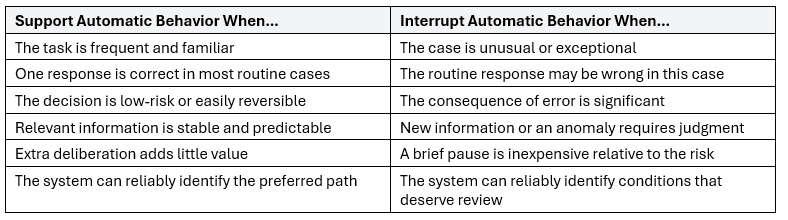
A useful rule is to support automatic behavior when the environment can reliably identify the routine correct response and interrupt it when the environment can reliably identify an exception for which additional attention has value.
When to Support Automatic Thinking
Support the automatic path when work is high-frequency, low-ambiguity, and has a clearly preferred response. Examples include entering required identifiers, routing a standard request, using an approved template, selecting a normal configuration, or attaching documentation that is required every time.
Forcing employees to reconsider these decisions repeatedly can add cognitive load without improving judgment. Prefill known information. Preselect the normal option when appropriate. Remove irrelevant choices. Put required information where the decision occurs. The principle is simple: if there is a routine decision with a reliably preferred answer, reduce the work required to choose it.
Do not make employees prove every day that they remember the process. Design the process so remembering matters less.
When to Interrupt Automatic Thinking
Other decisions deserve a pause. Interruption is more appropriate when the consequences are significant, the case is unusual, the automatic response is likely to be wrong, the choice is difficult to reverse, or the cost of slowing down is small relative to the cost of an error.
Return to the invoice illustration. An employee may approve hundreds of routine invoices each month. Repetition makes automatic processing useful, until one invoice is significantly above the purchase-order amount, comes from a new vendor, or duplicates an earlier charge. If the interface presents the same familiar “Approve” button, habit may carry the employee through an exceptional case as if it were routine.
A selective pause interrupts the automatic sequence and creates an opportunity for deliberate review. It is targeted so that not every approval becomes harder. A warning or confirmation can interrupt the routine flow, but it does not necessarily prevent the error: users may still dismiss the warning or confirm the wrong action. A true forcing function is stronger: it makes progression impossible until a required condition has been satisfied (Norman, 2013). Your design choice should match the risk. A moderately unusual invoice might justify a salient warning or confirmation. A transaction that violates a hard approval rule might justify blocking approval until a second reviewer authorizes it. Poor controls slow everyone down all the time. Good behavioral design adds friction selectively and in proportion to the risk.
Put Friction in the Right Place
Organizations already contain plenty of friction. The problem is that much of it is administrative rather than productive, what Sunstein calls sludge (Sunstein, 2021). Employees search across systems for information, re-enter data that already exists, decipher unclear terminology, and navigate unnecessary screens or approvals. That friction consumes attention without improving the decision.
Productive friction does the opposite. It introduces a small amount of effort when that effort improves judgment. A confirmation before deleting critical data can be productive. Requiring six clicks to locate the information needed to make the decision is not. A warning tied to an unusual transaction can be useful. Showing the same warning on every transaction until users automatically dismiss it is not.
The Architect’s job is therefore not simply to remove friction. It is to move friction: remove it from routine correct behavior and place it where automatic behavior creates risk.
Not all interruptions are equally strong. The amount of friction should match the risk:
· Signal: A warning or visual cue draws attention but leaves the action fully available.
· Confirmation: The system requires an additional acknowledgment before proceeding.
· Forcing function: The system prevents progression until a required condition is met.
In the invoice illustration, a modest variance might justify a signal; a new vendor plus an unusual amount might justify a confirmation; an amount that exceeds the authorization limit might require a forcing function, such as blocking approval until a second reviewer authorizes it. The Architect is not only choosing where to put friction, but how much friction the decision deserves.
The Tools of Choice Architecture
Once you know whether to remove or add friction, the next step is choosing a tool. Drawing from the six categories in Thaler and Sunstein’s NUDGES framework, I operationalize the tools used in this series as Defaults, Feedback, Incentives, Mapping, Error Elimination, and Structuring Complex Choices (Thaler & Sunstein, 2008).
- Defaults — Preselect the usual correct path or withhold a default when the case is unusual.
- Feedback — Confirm that a routine action is keeping you on track or flag an exception that needs attention before the mistake is made.
- Incentives — Make the desired action feel worthwhile, or make the risky shortcut feel costly.
- Mapping — Make consequences feel real at a glance, translate a high-stakes choice into outcomes the user can judge, or live a slice of the future to test the features in everyday conditions.
- Error elimination — Prevent a specific error path where possible. Use constraints or true forcing functions when an error must be blocked; use warnings, confirmations, or independent checks when the goal is to interrupt the routine path and invite additional review (Norman, 2013).
- Structured complex choices — Reduce a large set to the few options that matter, help users compare features when the tradeoff is real, and use the experience of others to help identify valuable options.
These tools can be used independently or in parallel to either ease the automatic path or create a deliberate pause. Next up in this series, we will spend time on Defaults, with a case study on how to diagnose when a default should ease the automatic path and when it should be withheld.